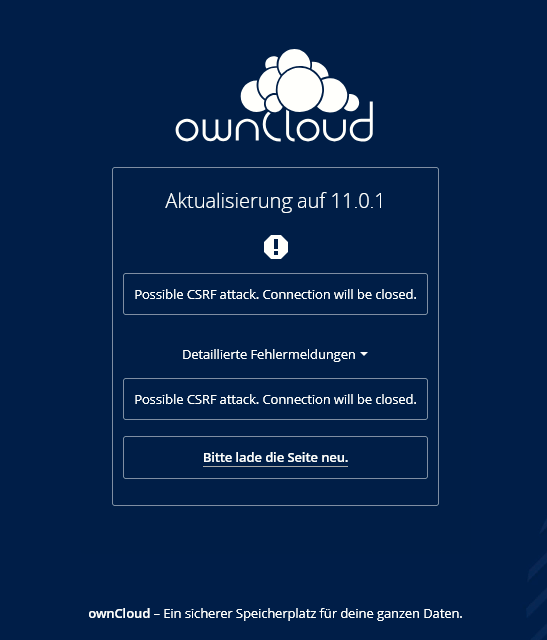
Updating to 11.0.1 brings "Possible CSRF attack. Connection will be closed."

Hi,

I am trying to update to version 11.0.1
As soon as I open “…/index.php” after applying the update I get the error

Possible CSRF attack. Connection will be closed.

Could not find any solution for this problem.

Any help will be appreciated, thank you.

Please share more details. Server version? Browser? Screenshot? Browser error console?

Hallo DeepDiver1975,

Thank you for reply. The whole thing escalated, the installed vers 10.16.1 runs on php vers 7.x, but Owncloud 11.x requires php 8.x, which I didn’t know.

So after updating the files I run the installer with php 7 and I assume this caused all this errors. After some tries and changing the php version to 8 things get messed up.

So I installed my backup of Owncloud and start from the beginning again BUT Softaclous offers no option to update this installation again, it must have marked somewhere that the vers 10.16.1 has been updated already and I don’t know where to make a change to revert this.

So I will have to wait until a new update is available to update my installation :frowning:

Thanks for reading.

Please note that the php7 based ownCloud Classic 10 line will be terminated soon.

I highly encourage you to update to ownCloud Classic 11.

Starting 11 we only support docker based installations - mainly to protect our user base from the hassle to upgrade PHP versions and do the proper configuration.

Thanks for answering.

I am on a shared server and therefore I have no direct access to the server. I would update immediately if anybody could tell me to get Softaclous to let me do the update.

My Linux knowledge is to small for “playing” around with docker installation. So therefore I am somehow lost :frowning:

But maybe somebody give me a hint to overcome the problem with Softaclous.

Thanks for reading.

Hello DeepDiver1975,

After some corrections (php vers and so on) I was able to run the update and again after starting the index.php again I get the CSRF error.

I tried with Firefox 158.0.1 and with Edge Version 156.0.4314.42 (Offizielles Build) (64-Bit)

Both show the same error

The error console brings following errors (pls note they are translated from german)

Content-Security-Policy: The site’s settings blocked the execution of an inline script (script-src-elem) because it violates the following directive: “script-src ‘self’ ‘unsafe-eval’”. Consider using a hash (‘sha256-Y1z0SyVx5S7ywM8HEuxVVkmBpqUjj6qZLBNBVk8E6h8=’) or a nonce. inject.js:31:26

Layout rendering was forced before the page had fully loaded. If stylesheets have not yet loaded, this can result in the content being displayed briefly without formatting. rc2Contentscript.js:247:11

TypeError: can’t access property “scrollHeight”, document.body is null rc2Contentscript.js:249:77

The resource at “https://cloud.xxxx.xxx/index.php/core/js/oc.js?v=1b1225d27719695a13af26586c2f7ee6” was blocked due to a MIME type mismatch (“text/html”) (X-Content-Type-Options: nosniff). index.php

Failed to load the with the source “https://cloud.xxxx.xxx/index.php/core/js/oc.js?v=1b1225d27719695a13af26586c2f7ee6”. index.php:32:84

TypeError: can’t access property “scrollHeight”, document.body is null 6 rc2Contentscript.js:249:77
Content Security Policy: The site’s settings have blocked the execution of an inline script (script-src-elem) because it violates the following directive: “script-src ‘self’ ‘unsafe-eval’”. Consider using a hash (‘sha256-h82hRAYWhbAQ3COOK+xcQ/mePEezPDvTSmJXTzF2jNw=’) or a nonce. index.php:136:10

Error: Promised response from onMessage listener went out of scope ExtensionMessagingService.js:89:34

Hope for solution
Thank you for reading

Nobody knows a solution ? Am I the only one to have this problem ?

Help appreciated…

Looks like your Firefox sec settings are blocking the execution of JavaScript script elements.
The error is the result of this.

Try a different browser or try adjusting your firefox settings

Thanks for replying DeepDiver1975.

I have tried it with Firefox and Edge, whereby Edge a clean installation (no add-ons) is.

With Firefox I have disabled relevant add-ons and JavaScript is enabled but both bring the same error.

I am clueless…

It’s actually quite sad that OwnCloud gets so much hype, yet you can’t really get any support anywhere when something goes wrong.

At least, not if you’re a basic user. It’s a different story if you pay—then you do get support. So, in the end, it’s just another commercial project.

In my opinion, that’s not exactly a hallmark of quality for OwnCloud—especially when I think back to how it all began.

Hi @Caretaker,

thanks for the console output and for testing with two clean browsers. That rules out the browser, so let’s look at the server. I’ve traced where this message comes from, and here’s what we know so far.

What the error means

“Possible CSRF attack. Connection will be closed.” comes from the web updater. When you click Start update, the page calls core/ajax/update.php and sends a security token. The server compares it with the token it stored in your PHP session when it showed you the update page. Here they don’t match. In practice that almost always means the server lost your session between the two requests, not that anyone is attacking you.

One more detail in your console output matters: oc.js came back as text/html instead of JavaScript. The server is hitting an error when it builds that file, and the error is probably related.

What I need to narrow it down

  1. The ownCloud log. The file owncloud.log in your ownCloud data directory, which you can usually reach with your hoster’s file manager. Please post the entries from around the time you opened the update page and clicked Start update. Remove anything private (domains, usernames, paths) if you like.

  2. Your session cookies. In Firefox or Edge:

    • Press F12, open the Network tab, and reload the update page.
    • Click the first request (the page itself). Under Response Headers, is there a Set-Cookie header? Which cookie names, and do they include secure or a path=?
    • Click Start update, then click the update.php?requesttoken=… request. Under Request Headers, is there a Cookie header, and does it include the cookies from the step before?

    Please post only the cookie names and attributes, not their values.

  3. From config.php: do you have any of overwrite.cli.url, overwritehost, overwriteprotocol, overwritewebroot or htaccess.RewriteBase set? If so, what are they? Also, is the site reached via https:// and is it in a sub-folder (for example https://example.com/owncloud)?

  4. Your PHP version on the hosting, and if the control panel shows it, the session.save_path setting. You switched from PHP 7 to PHP 8, and on shared hosting the new PHP version sometimes has a session folder that isn’t writable. That would produce exactly this error.

Possible ways around it

  • If your hoster offers SSH or a “run command” feature, running the upgrade from the command line avoids the web updater completely:
    php occ upgrade (in the ownCloud folder).
    Many hosters will also run this for you if you open a support ticket.
  • As a temporary last resort, you can add ‘csrf.disabled’ => true, to config/config.php, run the update in the browser, and then remove that line right away. Never leave it in place. It switches off a real security protection.

On support: ownCloud 11 officially supports only Docker-based installations. Running it from a tarball or Softaculous install on shared hosting is an unsupported setup. We don’t test the web updater in that environment, and we can’t promise it works there. I’ll still look at the log and cookie information if you post them, because it may point to a real bug. But please understand that this is best-effort help, not support for your setup. For a long-term solution, consider moving to a Docker-based installation (for example a small VPS) or a hoster that offers one.

Hello @DeepDiver 1975

Some parts are translated to English !

The ownCloud log shows :

text/plain owncloud.log ( ASCII text, with very long lines )

{“reqId”:“aujvP6LUXBBsac9BVi0-JwAAAEQ”,“level”:3,“time”:“2026-11-02T21:14:55+01:00”,“remoteAddr”:“212.88.13.76”,“user”:“–”,“app”:“index”,“method”:“GET”,“url”:“/cloud/index.php/core/js/oc.js?v=1b1225d27719695a13af26586c2f7ee6”,“message”:“Exception: {“Exception”:“OC\\NeedsUpdateException”,“Message”:”“,“Code”:0,“Trace”:”#0 \/home\/XXXXXX\/public_html\/cloud\/lib\/private\/legacy\/app.php(221): OC_App::loadApp(‘federation’)\n#1 \/home\/XXXXXX\/public_html\/cloud\/lib\/kernel.php(885): OC_App::loadApps(Array)\n#2 \/home\/XXXXXX\/public_html\/cloud\/index.php(33): OC::handleRequest()\n#3 {main}“,“File”:”\/home\/XXXXXX\/public_html\/cloud\/lib\/private\/legacy\/app.php",“Line”:285}"}

Content-Security-Policy: The page settings have blocked the execution of an inline script (script-src-elem) because it violates the following directive: “script-src ‘self’ ‘unsafe-eval’”. Consider using a Hashs (‘sha256-Y1z0SyVx5S7ywM8HEuxVVkmBpqUjj6qZLBNBVk8E6h8=’) or consider a nonce. inject.js:31:26
GET

https://XXXXXX.xx/cloud/index.php/core/js/oc.js?v=1b1225d27719695a13af26586c2f7ee6

NS_ERROR_CORRUPTED_CONTENT
Layout display was forced before the page was fully loaded. If stylesheets are not yet loaded, this may result in the content being displayed for a short time without formatting. rc2Contentscript.js:247:11
TypeError: can’t access property “scrollHeight”, document.body is null rc2Contentscript.js:249:77
Die Ressource von “https://XXXXXX.xx/cloud/index.php/core/js/oc.js?v=1b1225d27719695a13af26586c2f7ee6” was due to a MIME type conflict (“text/html”) blocked(X-Content-Type-Options: nosniff). index.php
Loading failed for the item with the source “https://XXXXXX.xx/cloud/index.php/core/js/oc.js?v=1b1225d27719695a13af26586c2f7ee6”. index.php:32:90

In the Network tab there is no Set-Cookie header, only GET’s

In the config.php there are no overwrite commands

Unfortionatly I have no access to session.save_path setting.

I have tried your suggestion with ‘csrf.disabled’ => true and got following warnings:

Warning: file_put_contents(/home/XXXXXX/public_html/cloud/data/crash-2026-11-02.log): Failed to open stream: No such file or directory in /home/XXXXXX/public_html/cloud/lib/kernel.php on line 1041

Warning: file_put_contents(/home/XXXXXX/public_html/cloud/data/crash-2026-11-02.log): Failed to open stream: No such file or directory in /home/XXXXXX/public_html/cloud/lib/kernel.php on line 1041

I really hope this helps.

I am sorry to say - but these php hosters with limited control are exactly the big pain points we have been facing at ownCloud since the very first days over 12 years ago.

This is also why we stopped the web updater and stopped supporting non docker setups.

I am sorry to say: but please get a proper server where you have full control and are able to fire up ownCloud in a docker env.

Thank you

The fact that ownCloud is trying to write a crash log and it isn’t allowed to, looks very bad. I don’t know if the crash happened due to your changes (maybe some typo that broke the syntax) or it was already there.

Double-check the FS permissions across the installation to make sure ownCloud (or likely apache or whatever user the web server uses) is able to write. I wouldn’t be surprised that the user owning the files changed, and now the web server can’t write in some of the locations. This also includes the location where the web server stores the sessions, which might not be writable any longer