Gibi
January 31, 2018, 3:39pm
1
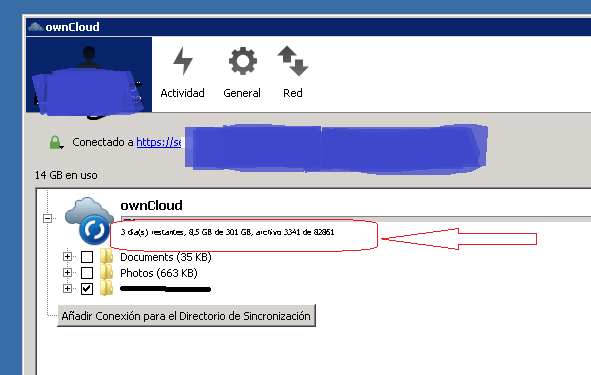
The text that appears below the progress bar informing about the remaining synchronization time is too small. Could you please increase the size of the letter? Thank you.
dmitry
January 31, 2018, 3:41pm
2
Could you provide a screen shot?
On what resolution are you using the desktop client?
dmitry
January 31, 2018, 3:55pm
4
You could open an new github issue with “Feature request” in the Title, for that small font to change.
Gibi
January 31, 2018, 4:06pm
5
Thanks dmitry
I’m not a github member, can you please put it on?
dmitry
January 31, 2018, 4:07pm
6
sure thing. I post the link here as soon as I am finished
opened 04:08PM - 31 Jan 18 UTC
closed 04:29PM - 31 Jan 18 UTC
Enhancement

A user in central informed us that the Text size in the progress bar is too small.
It would be nice if we could increase this.
Here is a link to the original post:
https://central.owncloud.org/t/text-size-of-the-progress-bar/11657/2
dmitry
January 31, 2018, 4:11pm
8
No Problem, let’s hope it will be implemented in the next release
Hey @Gibi ! Thanks a bunch for your report! We’ve seen this in the past:
opened 08:11PM - 19 Nov 14 UTC
closed 01:22PM - 24 Apr 17 UTC
Needs info
good first issue
Design & UX
Using version 1.7.0 (just installed)
The font in the user account tab is too sm… all. It is barely readable. It is more pixels than letters. See screenshots.
I am not aware of any configuration or setting out of the ordinary. I am using Win7 with all visual effects disabled (XP style).


(Images are real size. 100%)
<bountysource-plugin>
---
Want to back this issue? **[Post a bounty on it!](https://www.bountysource.com/issues/6316767-windows-progress-font-rendered-too-small-pixelish?utm_campaign=plugin&utm_content=tracker%2F216457&utm_medium=issues&utm_source=github)** We accept bounties via [Bountysource](https://www.bountysource.com/?utm_campaign=plugin&utm_content=tracker%2F216457&utm_medium=issues&utm_source=github).
</bountysource-plugin>
But back then we were unable to identify the exact way to reproduce this problem. Could you help us by posting here your windows version, resolution, theme and DPI?